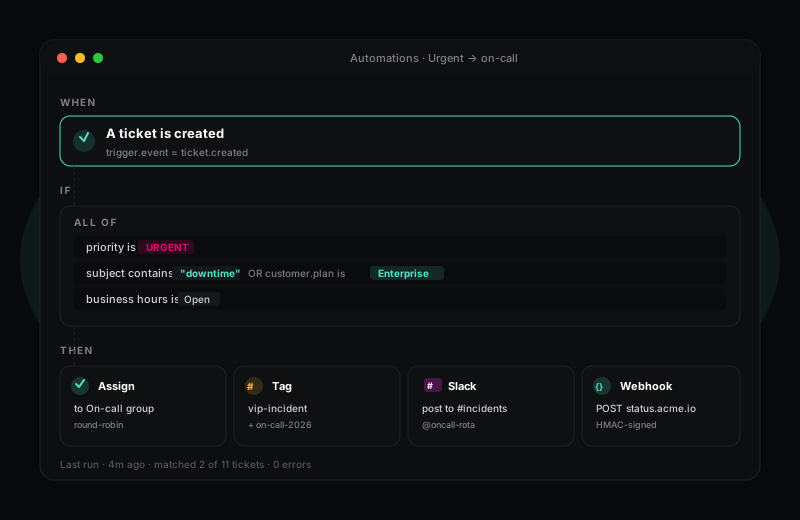
Routing, tagging, escalation and notifications — visual, debuggable, fast.
Every helpdesk is mostly the same five rules: assign by product area, escalate before the SLA breaks, post urgent tickets to Slack, close tickets that have been silent for a week, tag VIP customers. HelpWise lets you build all of those in five minutes — and the next twenty rules in another five.
14-day Pro trial · no credit card required
What you get
Most helpdesks force you to learn a domain-specific language to get anything beyond "auto-assign to a queue" working. HelpWise uses a visual builder that lays out the entire rule on one screen: trigger at the top, conditions in the middle, actions at the bottom. You can see what the rule does without scrolling.
Rules support nested AND/OR logic so you can express things like "if priority is urgent AND ((subject contains downtime) OR (customer is on Enterprise plan)) then assign to on-call". The same builder is used by macros — drop in a one-click rule that an agent can run manually when they need to.
When a rule does not behave the way you expected, HelpWise tells you why. Every automation execution writes to an audit log: which trigger fired, which conditions matched (and which did not), which actions ran, and the result of each. If you build a rule that misbehaves, you see exactly where the logic went wrong — without DM-ing your support engineer at midnight.
Webhooks are first-class. Any rule can fire an HMAC-signed POST to your own systems with a typed payload — useful for hooking into Jira, your CRM, or a Slack workflow. The webhook log shows the exact request and response so you can debug integrations end-to-end without leaving HelpWise.
Frequently asked questions
Sign up in under a minute. No credit card. Cancel any time. If HelpWise does not save your team time, do not pay us.