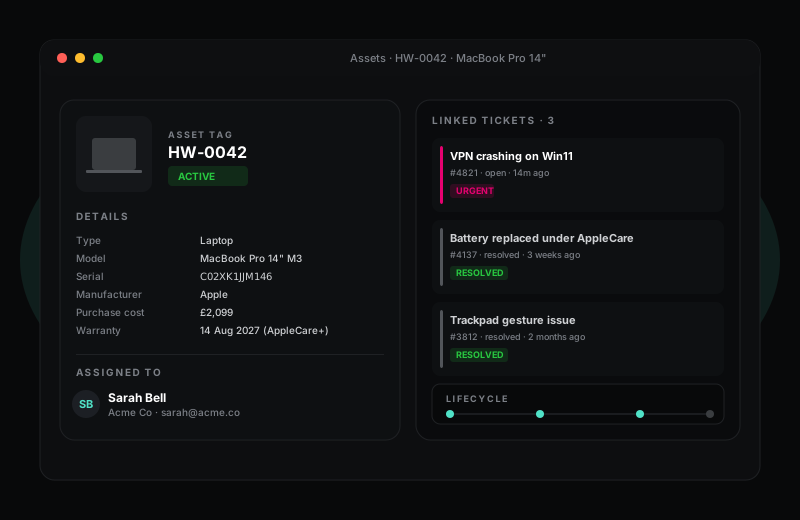
A clean asset register, not yet another spreadsheet.
HelpWise ships with an IT asset management module built into the helpdesk. Every laptop, phone, licence or piece of infrastructure can be tracked, assigned to a person or company, linked to its history of tickets, and reported on alongside the rest of the helpdesk data.
14-day Pro trial · no credit card required
What you get
Every IT team has tried the spreadsheet asset register. It works for about a quarter, then somebody buys a batch of laptops without updating it, somebody leaves and their laptop becomes unaccounted for, and the next time the auditor asks "where is asset HW-0042?" everyone shrugs. HelpWise puts the asset register where the actions happen — when a ticket about a device is closed, the asset record updates automatically.
Custom asset types let you model anything: laptops, phones, monitors, software licences, servers, network switches, even physical access cards. Each type has its own field schema (laptops want a serial number; software licences want a renewal date), its own icon, and its own lifecycle states.
Open an asset record and you see the device's entire ticket history in chronological order — every bug report, every repair, every replacement part. Useful when an agent picks up a ticket from a user complaining about "the same VPN issue again" — they can see immediately that this is the third time, and the previous two were resolved by upgrading the AnyConnect client.
For MSP teams (see MSP mode), the asset register is fully tenant-isolated. Each client's estate is separated; agent search can scope to one client or span them all; reports can break down by client, location or department. The same module that powers a small internal IT desk also runs a 5,000-device managed service contract.
Frequently asked questions
Sign up in under a minute. No credit card. Cancel any time. If HelpWise does not save your team time, do not pay us.