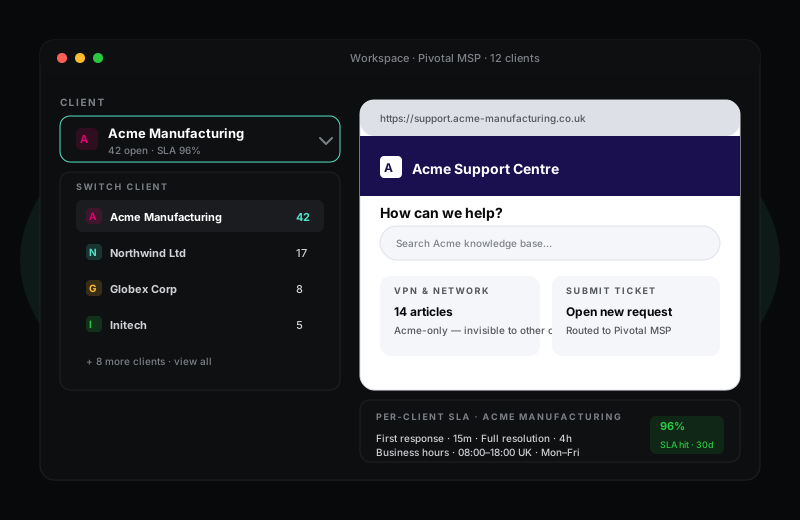
Manage every client from one workspace, but keep their data invisible to each other.
HelpWise has a dedicated MSP mode that turns the standard helpdesk into a multi-client operations centre. Each end-client gets their own portal, contacts, ticket numbering, KB visibility and SLA. Your agents see everything; your clients see only their own slice.
14-day Pro trial · no credit card required
What you get
A managed service provider running a different helpdesk for each client is in operational hell — different tools to learn, different SLAs to remember, different report formats to chase down. HelpWise consolidates everything into a single agent workspace where each ticket is tagged with its client, and every report can be filtered down to a single client in one click.
For your clients, the experience is the opposite — they only ever see their own slice. The portal is branded with their colours and logo on a domain you choose. Their tickets are numbered as #C1-001, not as ticket #487201. Their KB articles are theirs. None of this requires extra agents, extra seats, or extra fees per client — MSP mode is a single feature on the Enterprise plan.
MSP mode integrates with HelpWise's asset management module so each client's IT estate stays separated. Link a ticket to an asset and the next time someone opens it the asset history is right there — when it was bought, when it was last serviced, whose laptop it is. Useful when a Tier 1 agent picks up a ticket about a device they have never seen before.
Billing-friendly reports break ticket volume down per client, with optional time-tracking integration so you can roll the data up into a managed-service invoice. Export as CSV, or send via API to whatever billing platform you already run. None of this is bolted on as a separate product; it is part of the helpdesk.
Frequently asked questions
Sign up in under a minute. No credit card. Cancel any time. If HelpWise does not save your team time, do not pay us.