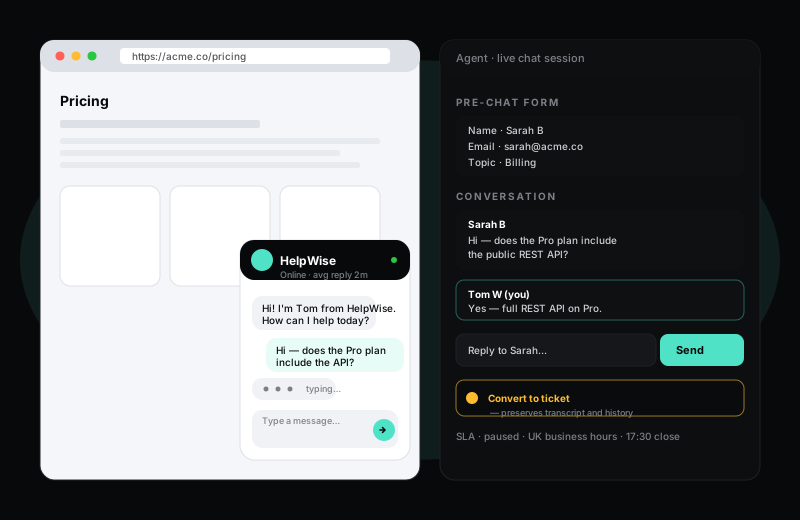
One drop-in script. Every conversation is searchable forever.
HelpWise ships with a real-time chat widget you can embed on any website with a single script tag. Customers get fast answers; agents get every conversation captured as a ticket with full history — so the conversation does not vanish the moment the customer closes the tab.
14-day Pro trial · no credit card required
What you get
A lot of chat tools treat each session as ephemeral — when the customer leaves, the conversation is essentially gone, buried in a transcript dump that nobody searches. HelpWise treats every chat as a first-class ticket. Every message is indexed, every agent action is logged, and every chat session becomes a searchable ticket the moment it is over.
That sounds small, but it changes how support works. When a customer comes back two weeks later asking "did your agent ever get back to me about the import?" the agent finds the previous chat in three seconds, with the full context, and picks up where it left off. No "I will need to forward this to the team" — just a continuation of the conversation.
The chat widget knows your team's business hours. Outside hours it switches to an offline mode, prompts the customer for an email address, and creates an email-style ticket so an agent can respond first thing. SLAs pause overnight. Nobody gets paged at 2am because someone in another time zone clicked "chat" instead of writing an email.
Inside business hours, chat routing is configurable per language, per product area, per agent group. Round-robin assignment with capacity caps keeps the load balanced; manual claim is also supported for teams that prefer it. Customers see typing indicators and read receipts so the conversation feels genuinely live, not like a bot pretending to think.
Frequently asked questions
Keep exploring
Sign up in under a minute. No credit card. Cancel any time. If HelpWise does not save your team time, do not pay us.