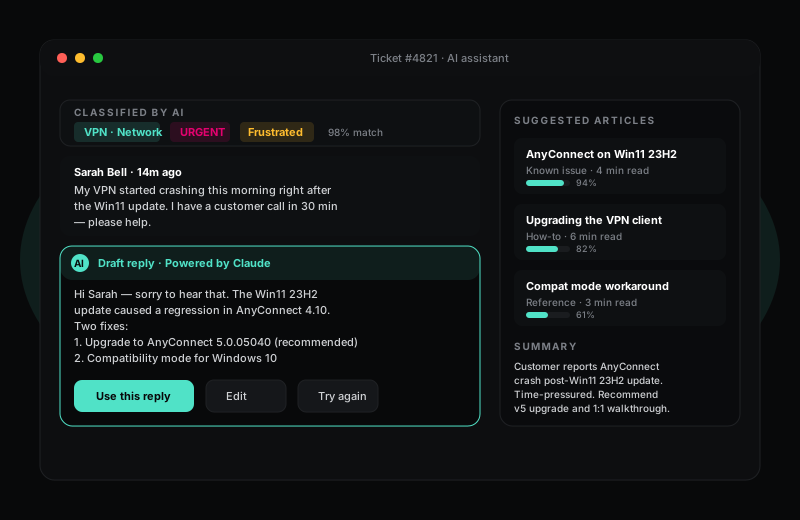
Triage, summarise and draft replies in seconds. Your agent stays in the loop.
HelpWise ships with AI features built in — not bolted on as a £15/agent add-on. Tickets are classified the moment they arrive, sentiment is scored, knowledge base articles are surfaced inline, and reply drafts are ready before the agent even opens the conversation.
14-day Pro trial · no credit card required
What you get
In most support teams, an agent's first 30 seconds on a ticket is just orientation — figuring out who the customer is, what they want, and which playbook applies. HelpWise compresses that to two seconds. The AI reads the ticket as soon as it lands, picks a category and priority, scores the customer's mood, and suggests three knowledge base articles that look relevant. By the time the agent opens the ticket, the boring work is already done.
Crucially, none of this is autonomous. The AI does not auto-reply to customers, auto-close tickets, or move them out of view. It just speeds up the human in front of the screen — because everyone we talked to during testing said the worst thing an AI helpdesk could do was send something they would have edited.
HelpWise uses Anthropic's Claude models because they consistently follow instructions, refuse to invent information, and give measured responses to angry customers. Reply suggestions are grounded in your own knowledge base — the AI cites the article it used, so an agent can verify in one click before sending.
AI is available from the Pro plan upwards. Each tenant gets a generous monthly usage budget; you can see exactly how much AI you have used in Settings, and we cap usage automatically so a runaway automation never produces a surprise bill. AI features can be turned off entirely if your security team prefers — the helpdesk works fine without them.
Frequently asked questions
Keep exploring
Sign up in under a minute. No credit card. Cancel any time. If HelpWise does not save your team time, do not pay us.